← Portfolio  /  Case Study
Case Study · Job Link Automation

JobLinkOS · From raw job link to qualified record, automated end-to-end

An end-to-end automation that collects job listings from 300+ career sites, filters duplicates, reads each posting with AI, and files complete records into a database. The client's team once did every step by hand. Two months after launch, monthly output had more than quadrupled.

Role · Sole Automation Engineer: architecture, build, maintenance Stack · n8n · Google Apps Script · Airtable · Supabase · OpenRouter · Decodo Note · Shared with the client's permission, no client data shown
01 · The Client's Problem

Four manual chores became one automated pipeline

Four chores, done entirely by hand for every batch. Here is what the same work looks like now.

✕ Before · All by hand
The same four chores, every single batch

1 · Link collecting

Open 300+ career sites one by one, sometimes with a VPN, and copy paste every link into a sheet.

2 · Links checking

Search the database for every collected link. Most turn out to be repeats.

3 · Data scraping

Open every surviving link and copy 10+ fields per job, one field at a time.

4 · Find address

Hunt the exact address in a masterlist, job by job. The most tedious step of all.

Hours of work per batch
✓ After · JobLinkOS
One sheet, two clicks, the rest runs itself

Automation menu

One Google Sheet is the control panel. Every step below starts from its menu.

Link Collector New

One click collects every job link from all 300+ career sites, allowed-state jobs only.

Duplicate filters

The sheet flags repeats by colour, then the Main Filter lets only truly new links through.

Data Scraper

AI opens each job page and fills in every field, one record every 30 seconds.

Find Address + Sync

The exact address fills itself from a 95,000-row reference database.

Done

Clean, complete records land in the database. Slack pings me if anything fails.

Runs on its own · 2 clicks per batch
02 · My Approach

Link collecting was automated last, on purpose

The most painful chores were automated first. Three months in, the Link Collector closed the final gap.

What it replaced

Opening each career site by hand, sometimes with a VPN, and copy pasting every link one by one. Each company has its own rules about which US states are allowed.

Was the last manual stepNow 1 click

The scale problem

300+ sites means 300+ small puzzles: different platforms, pagination, bot protection, region locks. Each one gets its own handler without touching the rest of the pipeline.

TaleoADPUKGDayforceiCIMSGreenhouse+ more
02 · The Pipeline

From link entry to qualified record

The seven-step journey from a company career page to a clean, address-verified record in Airtable.

1 · Collect the links

One click gathers every job link from 300+ career sites, allowed-state jobs only.

2 · Sheet entry and cleanup

Colour-codes duplicate links, gives each row a unique tracking ID, and sends the clean batch to the next step.

3 · Already-seen check

Every link is checked against the full database. Only truly new ones join the queue.

4 · Open the job page

Tries three ways to load each page in order, from free to paid, escalating automatically only when needed.

5 · AI reads the posting

AI pulls out the title, pay, location, and requirements. Low-pay postings are skipped before AI even runs.

6 · Fill in the address

Partial addresses are completed from the reference database.

7 · Check and save

The AI's output is double-checked, then the clean record saves to Airtable.

Live Demo

Watch the pipeline run

A 90-second run: duplicate flagging in the sheet, the filters and scraper in n8n, and records landing in Airtable.

Heads up: this video shows an earlier version of the system, before the Link Collector was added. An updated walkthrough is coming soon.
02 · The Guardrails

Built so nothing slips through

The guardrails built into the pipeline.

🆔

Unique ID per Row

Every link gets a permanent tracking ID, so updates always land on the right record.

🔍

Two-Layer Duplicate Check

Repeats are caught in the sheet first, then against the full masterlist. No duplicate reaches the queue.

🔧

Close to 40 Site Types Handled

Taleo, ADP, UKG, Dayforce, iCIMS, Greenhouse, Workable and more, each fetched its own way.

Priority Queue and Live Progress

The client can bump any company to the front of the next run and watch progress live in the sheet.

📡

Three-Way Page Loading

Each page is tried the free way first. Paid tools step in only when a page blocks them.

🤖

AI Reading with Output Check

AI reads the posting and fills the fields. A second step checks the result before it saves.

📍

Address Completion

Partial addresses are completed automatically from a 95,000-row reference database.

💰

Cost Control Built In

Obviously low-pay postings are skipped before the AI runs, so it never spends on a dead end.

🛡️

No-Overlap Protection

A new run exits if the previous one is still going, so nothing is processed twice.

03 · The Tools

Every workflow, fully wired

Screenshots of all workflows, showing every step, branch, and error path in the canvas.

Link Collector: Every Career Site, One Click

n8n · Menu-triggered · The last manual step, automated
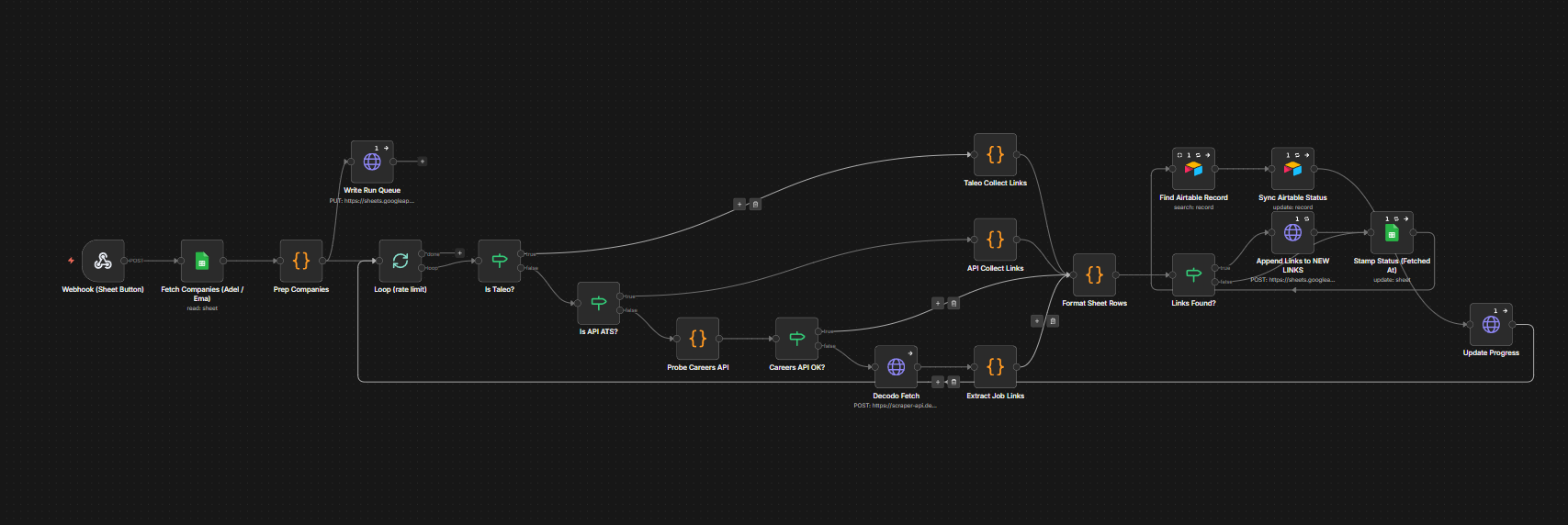
Link Collector: n8n workflow canvas
1
One Click, Every Site

From the sheet menu, it walks all 300+ career sites and collects every job link in one run, even pages listing 999+ openings.

2
A Strategy per Site Type

Close to 40 site types, each fetched its own way. Bot-protected sites go through a scraping service, replacing the manual VPN.

3
Filter, Append, and Stamp

Only allowed-state jobs are kept, new links land in the sheet, and each company's visit date is stamped automatically.

Initial Filter: Google Sheet Automation Menu

Apps Script · Menu-triggered
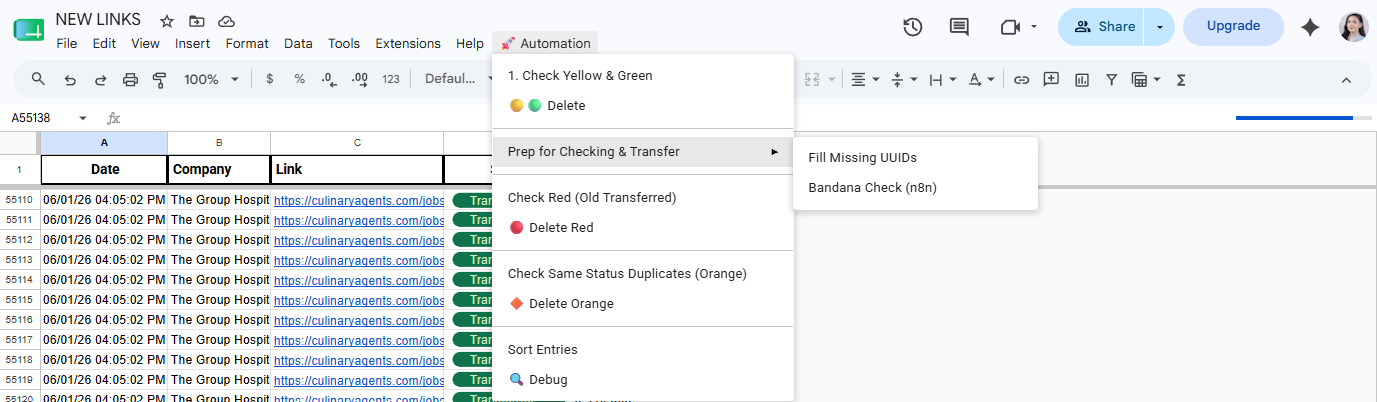
Google Sheet Automation menu
1
Four-Colour Duplicate Flagging

Four colours mark four kinds of repeat, from already-processed links to same-day resubmissions, so every row's state is visible at a glance.

2
Tracking ID Assignment

Every new row gets a permanent tracking number the rest of the system uses to follow it.

3
Send to Automation and Sort

One click sends all pending links to the next step and re-sorts the sheet, oldest first.

Main Filter: Already-Seen Check and Queue Push

Triggered automatically · Already-seen check
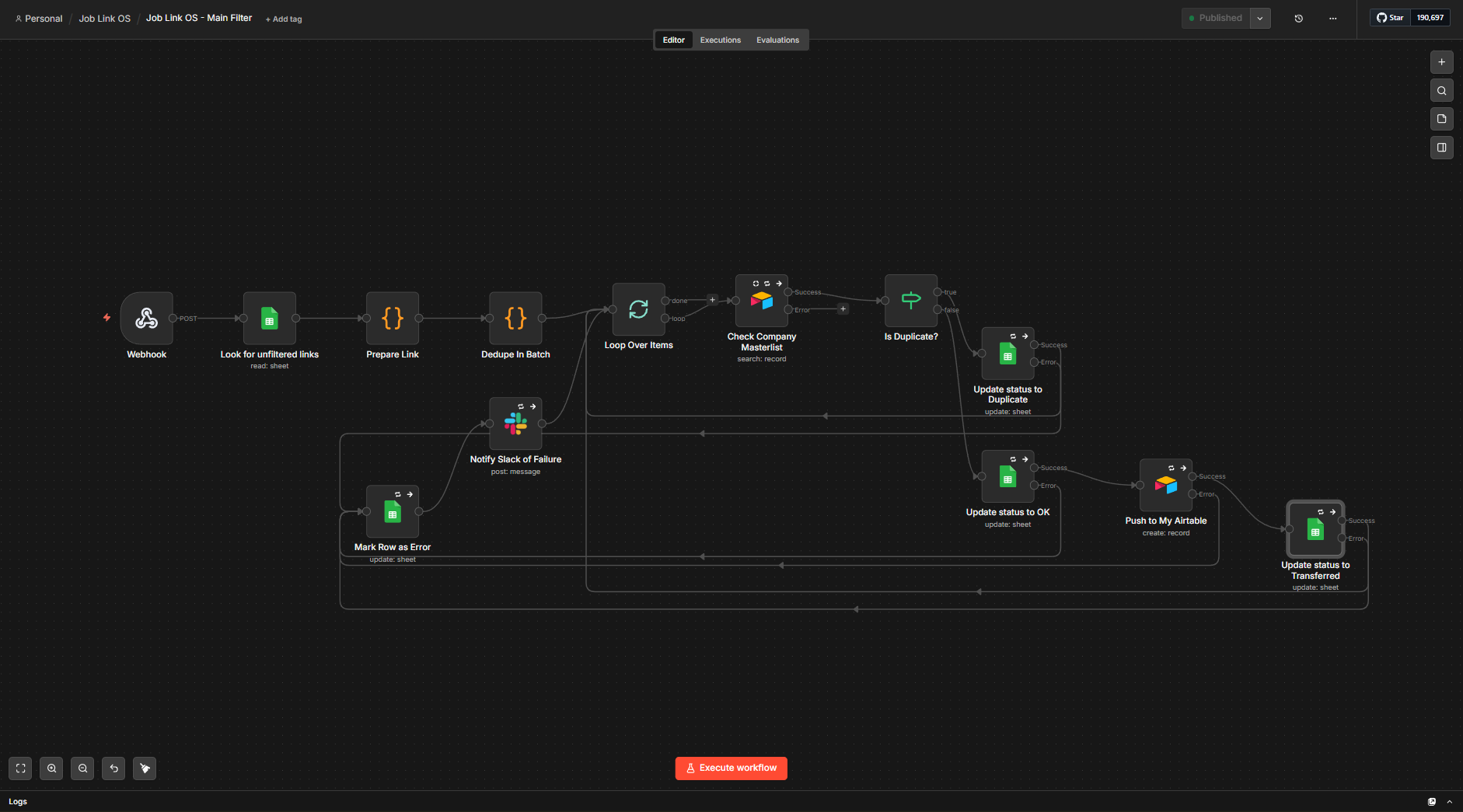
Job Link OS Main Filter: n8n workflow canvas
1
Read and Clean Up

Reads the submitted links, strips tracking junk from each URL, and de-duplicates the batch.

2
Already-Seen Check

Each link is checked against the full job database. If it was submitted before, the sheet row is updated to show that. If it is new, it moves forward.

3
Push and Confirm

New links join the processing queue and the row is marked Transferred. Any error marks the row and pings Slack.

Data Scraper: Open, Read, and Save

Runs on a schedule · AI extraction to Airtable
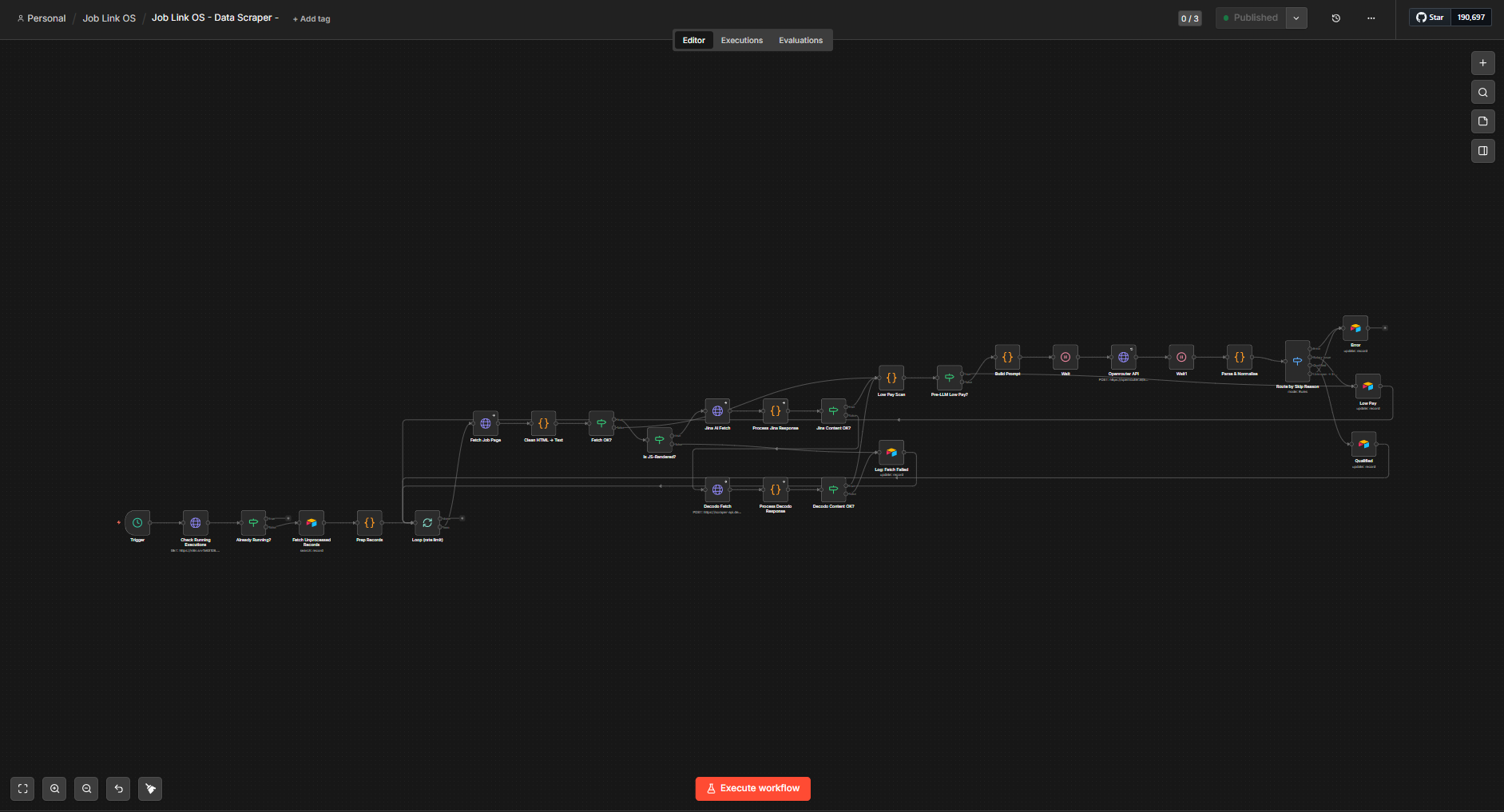
Data Scraper: n8n workflow canvas
1
No Double-Runs and Link Cleanup

Checks that no previous run is still going, then rewrites platform links into a directly fetchable format.

2
Three-Way Page Loading

A standard request first, a rendering tool if the page needs JavaScript, and a paid tool only as a last resort.

3
Salary Pre-check and AI Reading

Obviously low-pay postings are skipped at no cost. Everything else is read by AI, field by field.

4
Output Check

Extracted salaries are sanity-checked. Records below the pay threshold are marked skipped, not qualified.

5
Save to Airtable

Each record saves as Qualified, Salary Issue, or Error. Incomplete addresses are flagged for the Find Address workflow.

6
Slack Notifications

Every skipped record sends a Slack message with the reason. Qualified records save silently.

Find Address: Completing Partial Addresses

Runs on a schedule · Reference database lookup
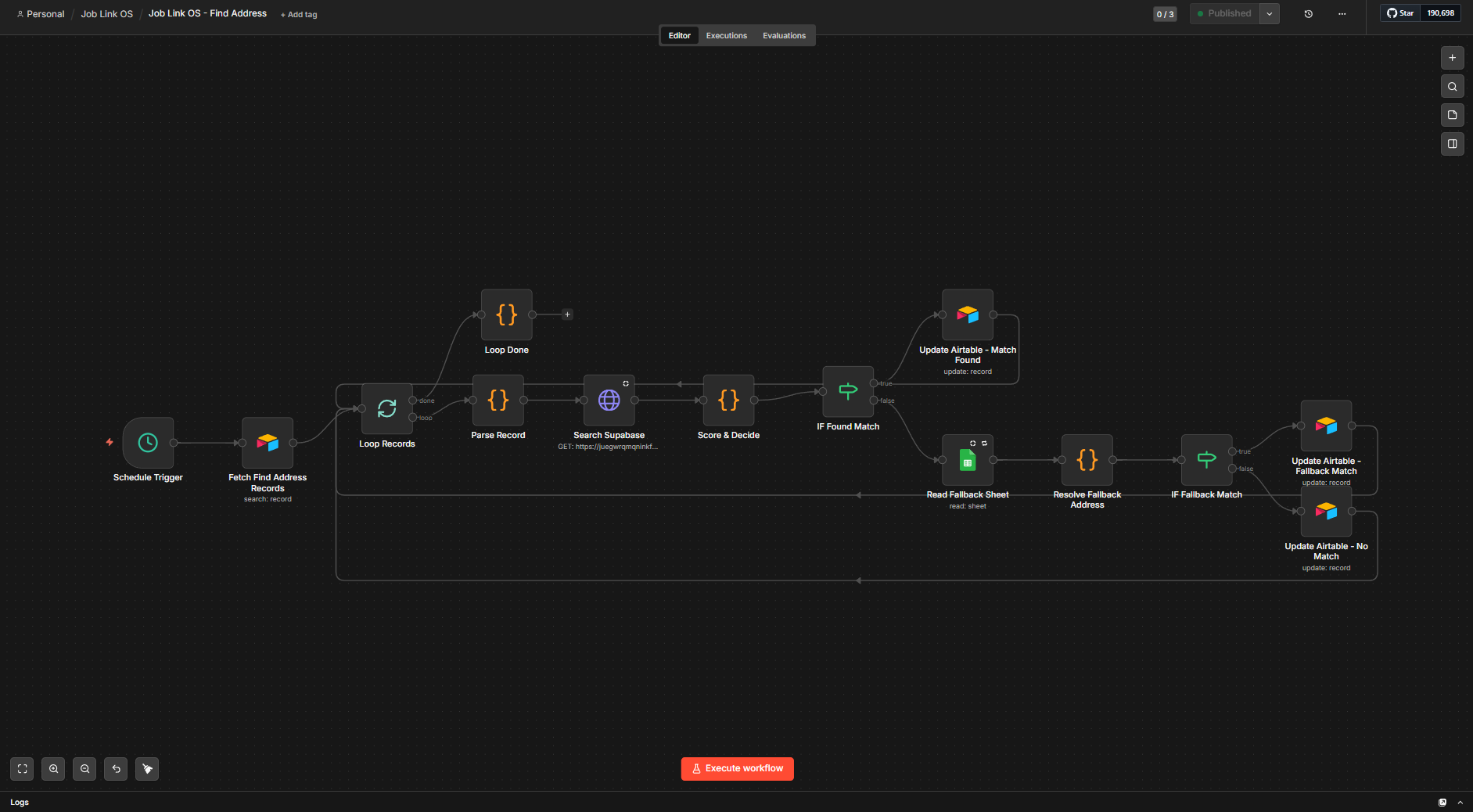
Find Address workflow: n8n canvas
1
Pick Up Incomplete Records

Finds all records in Airtable that the scraper flagged as having an incomplete address and processes them one by one.

2
Search the Reference Database

Breaks the partial address into pieces and searches the 95,000-row database for companies that match by name, returning the top candidates to score.

3
Best-Match Scoring with Fallback

Candidates are ranked by closeness of match, with a backup lookup if nothing hits. Worst case, the original partial address is kept.

Sync Database: Keep the Address Reference Up to Date

Run manually as needed · 95,000 rows
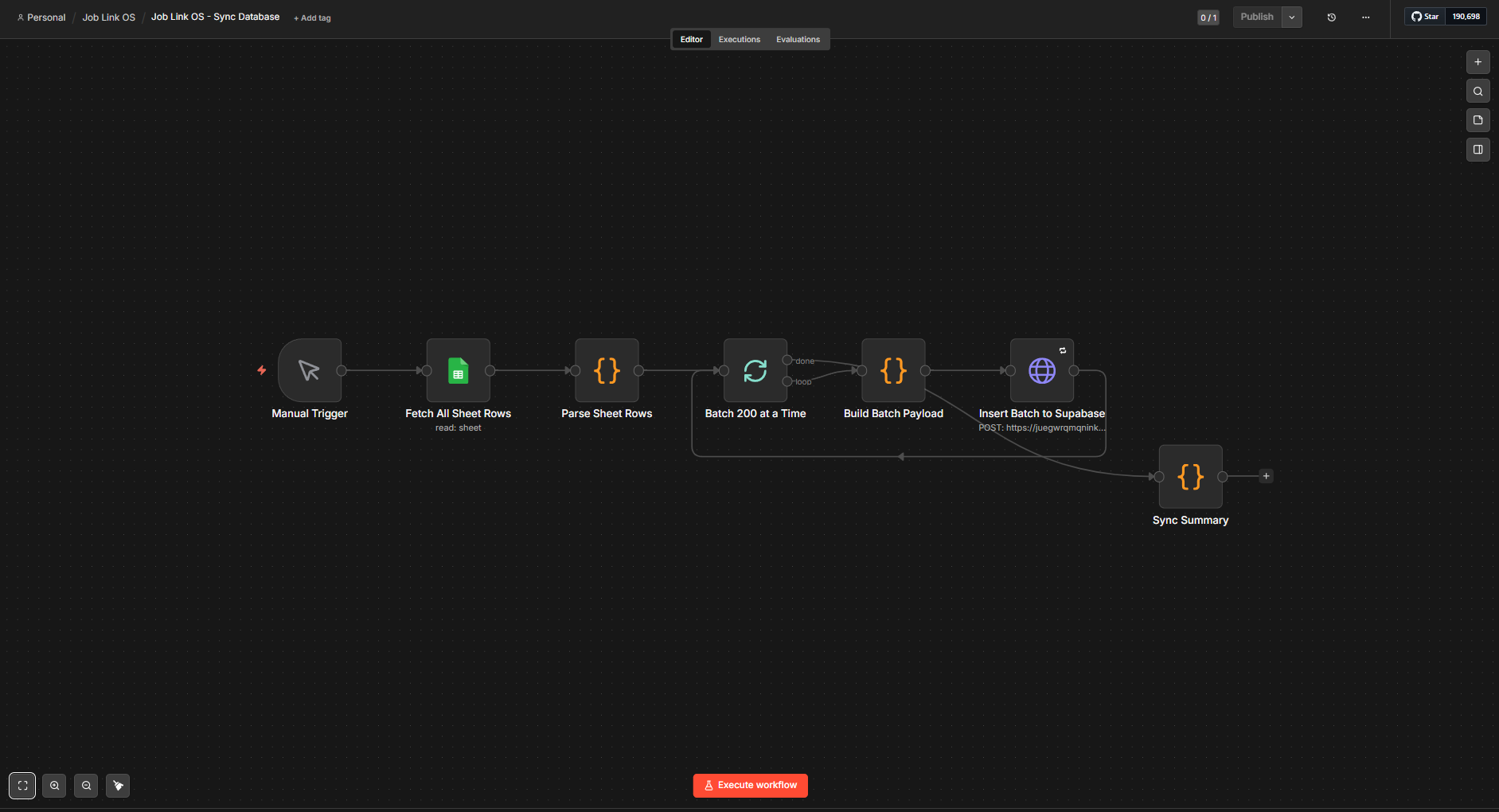
Sync Database workflow: n8n canvas
1
Read the Address Sheet

Reads the master address sheet and prepares every row for upload.

2
Upload to the Reference Database

Uploads in batches. Existing rows are skipped, so re-running never creates duplicates.

3
Sync Summary

Reports how many rows were added and how many skipped. Run it whenever the masterlist changes.

Companies Sync: Keep the Companies List and Database in Step

n8n · Supporting workflow · New
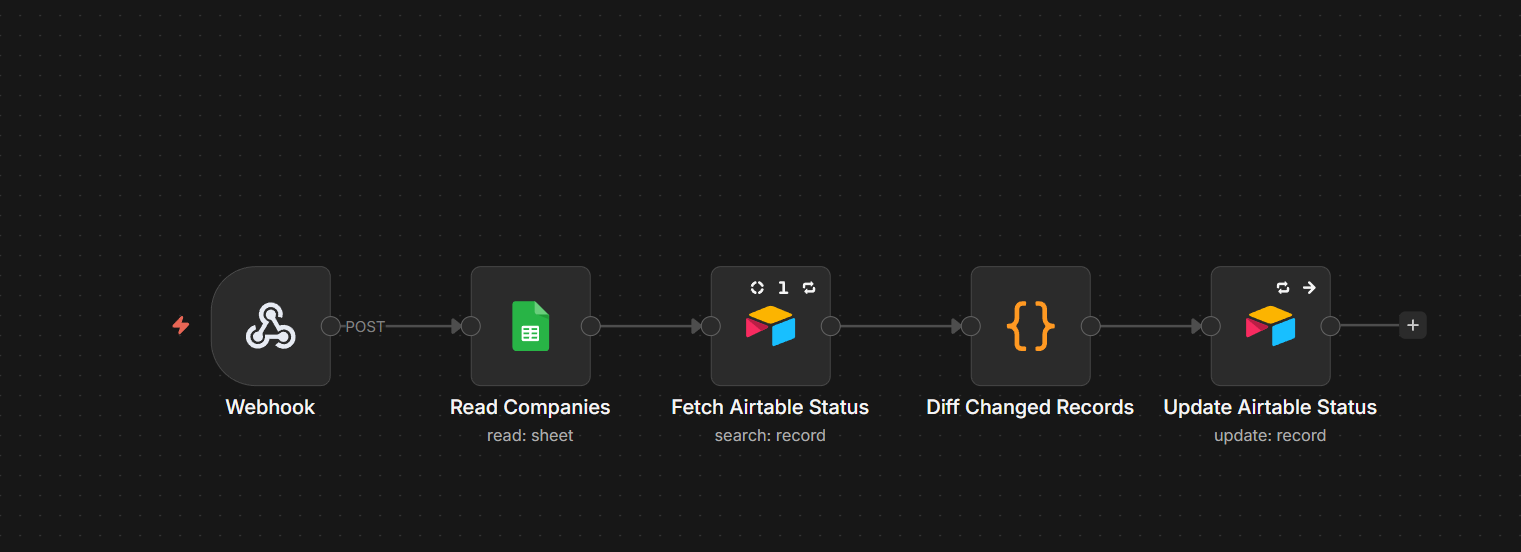
Companies Sync: n8n workflow canvas
1
Read Both Sides

Reads the companies list in the sheet and fetches the matching records from the shared database, so the two can be compared in one pass.

2
Update Only What Changed

Compares the two and updates only the records that actually changed, keeping the sync fast and avoiding unnecessary writes.

3
Fresh Dates for the Team

A small companion to the Link Collector: the client's team always sees fresh last-updated dates for every company, with no manual logging.

03 · The Stack

The stack, and how AI was used

Every tool in the pipeline, and exactly where AI fits in.

AI Transparency

In the pipeline: an AI model (DeepSeek, via OpenRouter) reads job pages and fills in the fields. Every AI output passes rule checks before it is saved.

In the build: I used Claude (Anthropic) as an assistant for drafting code and copy. The architecture, decisions, testing, and client work are mine, and I review everything the AI touches before it ships.

n8n (self-hosted, Hostinger VPS) Google Apps Script Google Sheets Airtable Supabase / PostgreSQL OpenRouter (DeepSeek Chat v3) Jina AI Reader Decodo Web Scraping API Slack GitHub (workflow JSON exports)
04 · The Outcome

Job links completed per month

Completed job links are the team's core monthly output number. The automation went live at the start of May.

Manual Automated
20k 15k 10k 5k January · 3,565 job links · manual February · 3,411 job links · manual March · 3,826 job links · manual April · 2,870 job links · manual May · 12,599 job links · automated June · 14,822 job links · automated July · 19,786 job links · automated 3,565 3,411 3,826 2,870 12,599 14,822 19,786 5.8x the manual average Jan Feb Mar Apr May Jun Jul
June ran with the client mostly away from the desk. The pipeline kept collecting, checking, and filling records on its own.
Scraping Cost Savings

The scraping service behind the collector was quietly billing every request at its most expensive tier. An audit caught it and cut scraping costs by 42%, with no change to coverage or results.

Available for workflow engineering and data operations roles.

Open to automation projects, contract work, and full-time positions.