← Portfolio  /  Case Study
Case Study · AI Automation

JobMatch AI - A Slack bot that finds jobs and writes the resume

A small Slack bot that listens for a job search, finds matching openings, and writes a fresh, tailored resume for every single one. No browser tabs, no copy-paste, no rewriting the same résumé for the tenth time this week.

Role · Sole Automation Engineer: architecture, build, testing Tools · n8n · Slack · Gemini · OpenRouter · Google Docs · Gmail
The Problem

Tailoring a résumé for every job is exhausting

Every serious application needs a custom CV, but doing that for thirty roles a week, by hand, is impossible.

Before

Hours rewriting the same bullets

Open the role, read the description, copy the resume, rewrite the top three bullets to match keywords, save a new version, draft an email, paste the link, repeat. Times thirty.

After

One Slack message does the lot

Type a search, get back fresh job listings - each one with its own tailored resume already saved to Drive and a draft email sitting in Gmail, ready to send.

How It Works

Five simple steps

No technical knowledge needed to follow this, every box is a thing happening in the background, automatically.

1 · Ask in Slack

Tag the bot with a job search like "remote data entry."

2 · Validate

An AI checks if the message is actually a job query before any real work starts.

3 · Search jobs

Pulls fresh listings from a job-search API and filters out junk results.

4 · Tailor résumé

For each job, a fresh résumé is generated and saved to Drive, named for the role.

5 · Deliver

Slack reply with title, apply link, and résumé link. Email draft if there's a recipient.

Live Demo

Watch it run

A short clip showing one Slack message turn into three tailored applications.

JobMatch AI fielding a search and producing tailored résumés, end to end.
Inside The Build

The full workflow

Here's the entire automation laid out end-to-end. The three stages below break this same canvas into bite-sized pieces.

Complete n8n workflow - Slack trigger to job-channel reply

~20 nodes · 3 stages
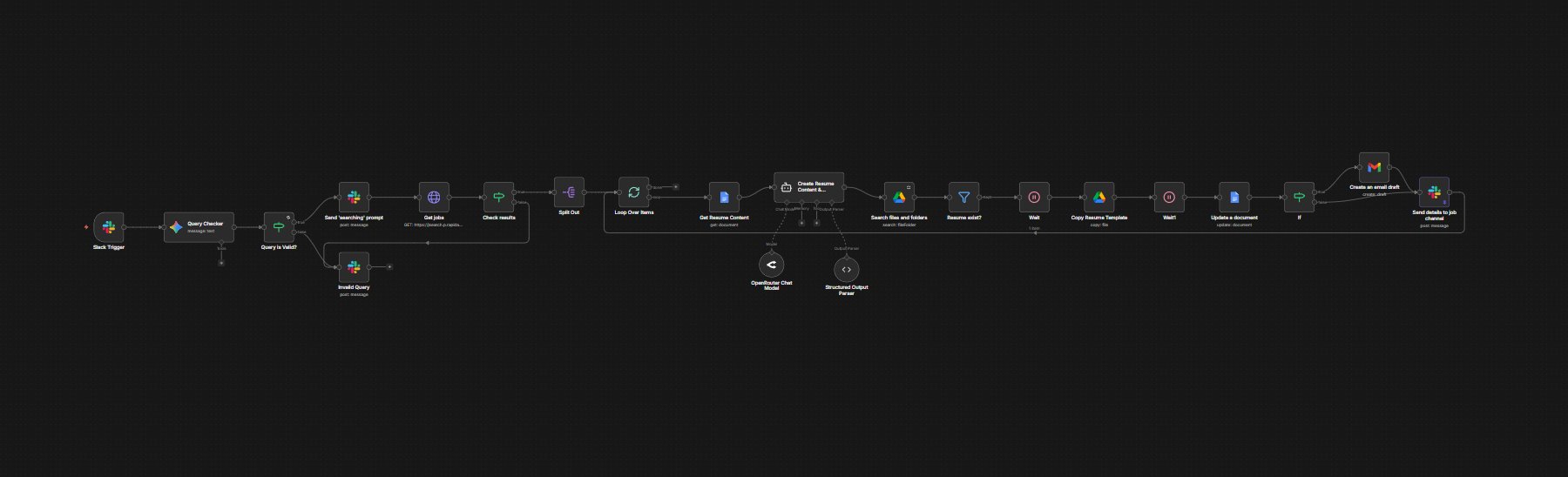
Full n8n workflow canvas: Slack Trigger → Query Checker → Validate → Send searching prompt → Get jobs → Check results → Split Out → Loop Over Items → Get Resume Content → Create Resume Content AI agent → Search files and folders → Resume exist filter → Wait → Copy Resume Template → Wait → Update document → IF → Gmail draft → Send details to job channel
The whole pipeline in one canvas. Read left-to-right: a Slack mention triggers it, and every job from the search loops through tailoring and delivery.
1
Listen & Search

Slack trigger, query validation, JSearch API call, result check, split into single jobs.

2
Tailor

Read master résumé, AI rewrites bullets, structured output, duplicate check, rate-limit wait.

3
Deliver

Copy template, inject content, optional Gmail draft, post summary back to Slack.

Stage-by-stage

Three stages working together

Same canvas as above, broken into the three things it actually does.

Stage 1 - Listen & Search

filters bad queries
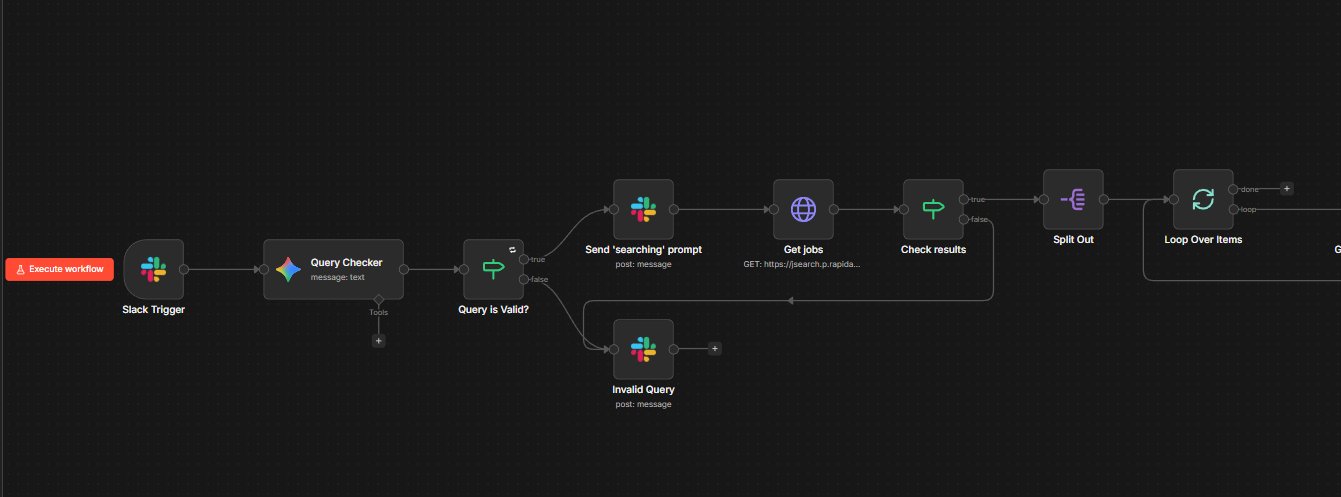
n8n canvas: Slack trigger, Query Checker, Send searching prompt, Get jobs, Check results
  • 1
    Listens for the mention

    Slack triggers the workflow when someone tags the bot with a query.

  • 2
    Validates with Gemini

    An AI classifier decides if the message is a real job query or noise. Junk stops here.

  • 3
    Sends a "Searching…" prompt

    Posts back to Slack so the user knows the bot is working - not silently stuck.

  • 4
    Hits the JSearch API

    Fetches fresh job listings, typically three to five per query.

  • 5
    Checks the results

    If the API returned nothing useful, the bot says so instead of pretending it found jobs.

  • 6
    Splits into one-at-a-time

    Hands the jobs off one by one so the next stage can process each cleanly.

Stage 2 - Tailor

résumé per job
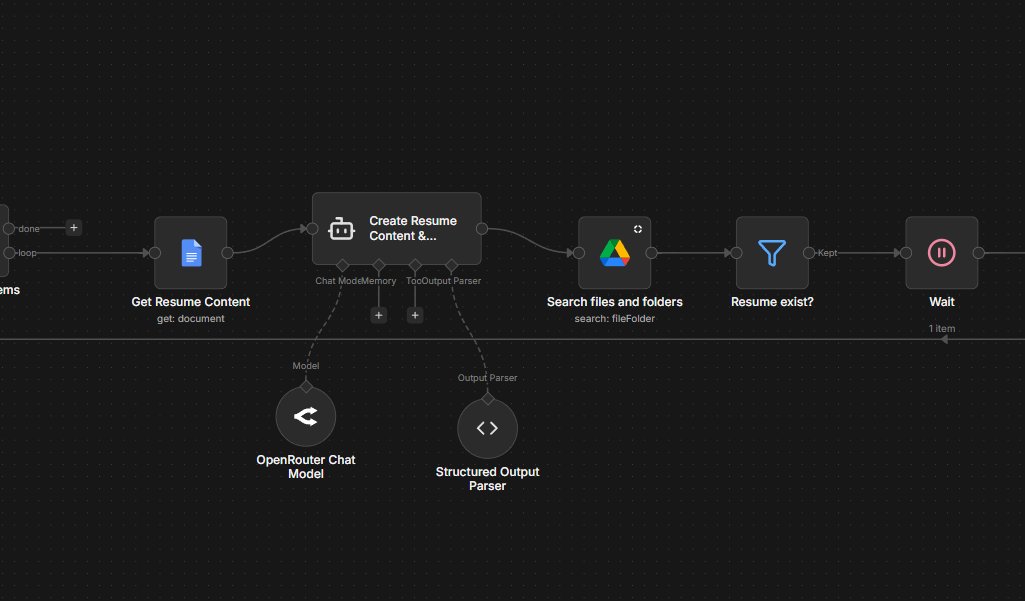
n8n canvas: Get Resume Content, Create Resume Content AI agent, Search files, Resume exist filter, Wait
  • 1
    Reads the master résumé

    Pulls the latest content from a Google Doc - the single source of truth for the CV.

  • 2
    AI rewrites the bullets

    An OpenRouter agent reads the job description and tailors bullets and the proposal to match.

  • 3
    Structured output, every time

    A schema parser keeps the shape consistent. No prompt drift, no broken docs.

  • 4
    Checks Drive folder

    Confirms the destination folder exists before trying to save anything to it.

  • 5
    Avoids overwriting

    If a résumé for this exact role already exists, it skips and moves on.

  • 6
    Pauses between calls

    A small wait stops the workflow tripping over Google Drive's rate limits.

Stage 3 - Deliver

email + Slack
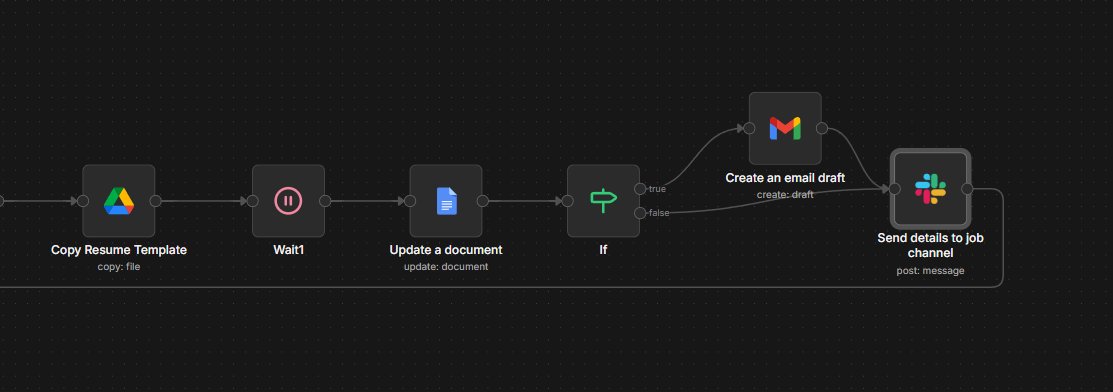
n8n canvas: Copy Resume Template, Wait, Update document, IF condition, Gmail draft, Slack post
  • 1
    Copies the template

    A fresh Google Doc is created and named for the role. Formatting stays consistent across every output.

  • 2
    Updates the document

    Injects the AI-tailored bullets and proposal into the new copy.

  • 3
    Decides on the email

    Checks whether the listing actually has a recruiter email to write to.

  • 4
    Drafts a Gmail (if applicable)

    If there's a recipient, a draft is queued - ready to review and send.

  • 5
    Posts back to Slack

    One clean message per job: title, apply link, résumé link. All in the channel.

  • 6
    Loops to the next job

    Repeats until every job from the original search has its own résumé and Slack post.
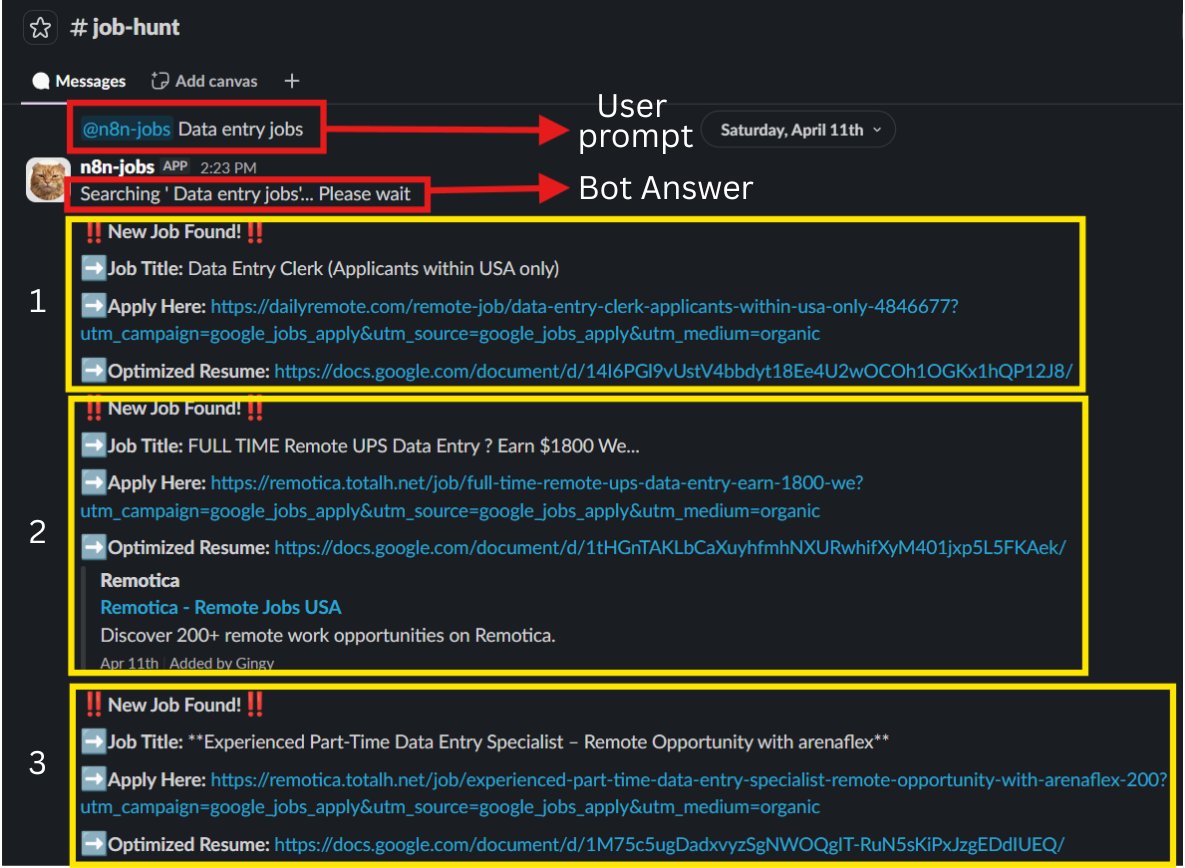
The Slack Experience

One message in, four artefacts out

No custom UI to learn - just type a search. Everything that comes back is something you can act on immediately.

Slack thread showing the bot finding three jobs and posting tailored resumes for each

Things you can ask

Job searches
  • Data entry jobs
  • Remote VA roles
Specific titles
  • Automation Engineer NZ
  • n8n developer remote
Or anything in between
  • Part-time bookkeeping
  • Customer support remote NZ
Trigger
Slack @mention
AI Models
Gemini · OpenRouter
Job Source
JSearch API
Output
Doc + Email + Slack
The Results

What changed for the workflow

1
Slack message

Replaces opening five tabs and switching contexts.

~30s
Per match

From query to a tailored résumé saved in Drive.

4
Artefacts per job

Title, apply link, tailored doc, optional email draft.

0
Browser tabs

Everything stays inside Slack until you click apply.

Built With

Tools used

Familiar, reliable platforms, no exotic tech.

n8n Slack Gemini (Google) OpenRouter JSearch API Google Docs Google Drive Gmail

Need something like this for your business?

I build small, reliable AI automations that quietly take a workload off your team's plate. Open to client work and full-time roles.

Get in touch →